Free Download
The Simplest Method to Save Audio from YouTube
AuthorRecommended by the author

SoftwareHow to & Tips

Video FormatsConvert Video

Resources

How to Save Audio from YouTube: 3 Practical Methods

Author: Kevincy by Kevincy

Updated on Sep 29, 2026

Want to keep a song, speech, BGM, or other audio from YouTube for offline listening? This guide explains three practical ways to save audio from YouTube.

If you need a regular audio file such as MP3, M4A/AAC, WAV, FLAC, OGG, or WMA, the desktop method gives you the most control over output format and batch processing.

YouTube contains music videos, live performances, interviews, tutorials, podcasts, and many other videos whose audio you may want to hear offline. The best method depends on what you actually need: an audio file stored on your computer, an official offline copy that stays inside YouTube or YouTube Music, or a quick browser-based conversion. This guide covers all three cases and also explains which audio format makes sense for different devices and uses.

Important: Download only videos or audio you own, have permission to use, or are otherwise allowed to download under applicable law and the platform's terms.

3 Practical Ways to Save Audio from YouTube

Method 1 – Download and Convert YouTube Audio on Windows

If you want a normal audio file that can be copied to a phone, USB drive, media player, or another app, a desktop downloader/converter is the most flexible option. WonderFox HD Video Converter Factory Pro can analyze supported YouTube URLs, download available video/audio streams, and then batch convert audio or video to the format you need.

DownloadDownload it on Windows and follow the steps below.


This workflow also applies to many music videos found on YouTube, including Vevo-branded videos, as long as the URL is publicly accessible and can be analyzed. If a video is private, age-restricted, protected, unavailable in your region, or affected by a YouTube site change, URL analysis may fail.
Far Beyond Saving YouTube Audio Files...
HD Video Converter Factory Pro
  • 1. Batch download supported YouTube videos, audio, playlists, and channels.
  • 2. Download supported online video and audio from many popular sites.
  • 3. Convert video/audio with 500+ format and device presets.
  • 4. Record live music, concerts, operas, etc. with ease.
  • 5. Compress large-sized A/V files with minimal quality loss.
  • 6. Trim, merge, flip, crop, rotate, watermark video easily.
  • 7. Adjust resolution, bitrate, sample rate, channels, and other parameters.
  • 8. Create ringtones, make animated GIFs from videos and images.
Download Free Download
Product Page Product Page
Compatible with Windows 11, 10, 8, 7 Windows, 100% Clean!

How to Download YouTube Audio and Save It in the Format You Need

how to save music from YouTube

Before starting, please free downloadfree download the software.

Step 1: Copy and Analyze the YouTube URL

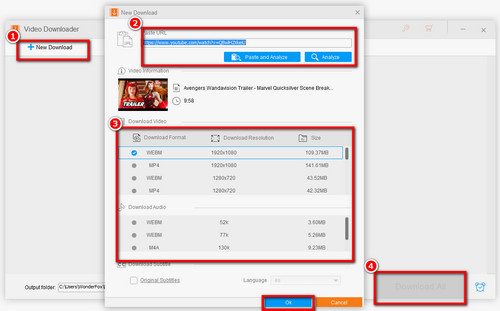
Open HD Video Converter Factory Pro and choose Downloader. Click "New Download", paste the YouTube video, playlist, or other supported URL into the box, and click "Analyze". You can repeat this process to add more items when you want to download in batch.

Step 2: Choose an Available Download Option

After the analysis finishes, select an available video or audio option and click OK to add it to the queue. Choose an output folder and press "Download All". If a suitable audio-only option is available, you can stop here.

Convert Downloaded YouTube to Audio

Step 3: Convert the Downloaded File to Audio (Optional)

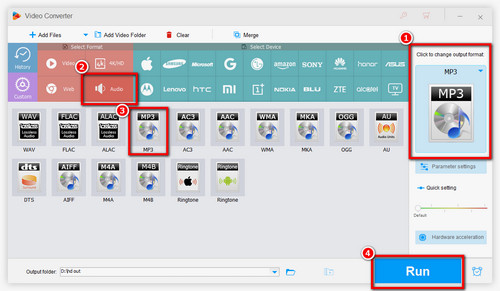
If the downloader does not offer the audio format you want, close Downloader, open Converter, and import the downloaded file. Open the output-format panel, go to the Audio category, and choose a suitable profile.

Step 4: Start the Audio Conversion

Click the inverted-triangle icon at the bottom to choose an output folder, then click "Run".

📌 Note that converting a lossy YouTube source to WAV or FLAC does not restore audio detail that was already removed by the source compression.

Besides downloading, HD Video Converter Factory Pro can convert local media, trim audio/video, merge files, compress media, record the screen or system audio, and change common encoding parameters. These extra tools can be useful when the source needs a small edit before you listen or transfer it.


Disclaimer: Downloading or converting online media may be restricted by copyright law, licensing terms, or a website's terms of service. Use these methods only for content you are authorized to save.

Which Audio Format Should You Choose?

You do not need to chase a specific format unless a device or app requires it. For most users, the following rules are enough:

MP3: The safest default for compatibility with phones, cars, TVs, portable players, editors, and older software.

M4A/AAC: A good modern choice with efficient compression. AAC is the audio codec, while M4A is a common container that often stores AAC audio.

WAV or FLAC: Useful when a workflow specifically needs lossless files, but they take more space. Converting YouTube's compressed audio to a lossless format does not improve the original source quality.

WMA: Still useful for some older Windows software, media players, or devices, but it is less universal than MP3 or AAC for general use.

OGG: A practical open-format option when your target player or software supports it.

Method 2 – Use YouTube or YouTube Music's Official Offline Downloads

Save YouTube music for offline listeningOfficial offline listening keeps downloads inside YouTube or YouTube Music

If your goal is simply to listen without an internet connection, the official download option is the cleanest choice. YouTube Music Premium members can download eligible songs, albums, playlists, and music videos in the YouTube Music app on Android, iPhone, and iPad. You can also enable Smart Downloads so the app automatically keeps a selection based on your listening history.

These downloads are for offline playback inside the YouTube Music app rather than ordinary MP3, AAC, or WMA files that you can freely move to other apps. You normally need to reconnect to the internet at least once every 30 days to maintain music downloads.

For regular YouTube, Premium members can download eligible videos for offline viewing on supported mobile devices and desktop browsers. However, YouTube's official app does not provide a button to export a separate MP3 or other audio file.


Basic YouTube Music steps: Open the YouTube Music app, find a song, album, or playlist, tap the menu or download icon, and choose Download. To use Smart Downloads, open your profile picture > Settings > Downloads and storage, then enable Smart Downloads.

Method 3 – Save YouTube Audio with an Online Converter

Save YouTube Audio with an Online ConverterSave YouTube Audio with an Online Converter

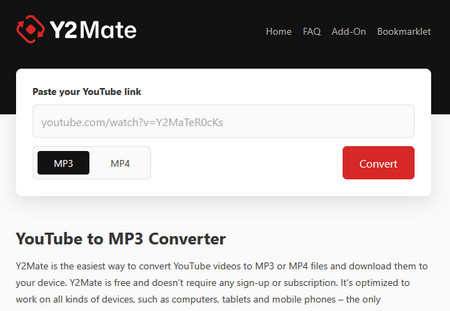
An online converter can be convenient when you do not want to install software. For example, Y2Mate.gs currently accepts common YouTube links and provides MP3 or MP4 output in a web browser.

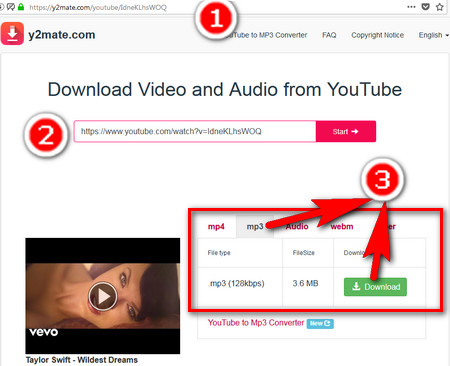
Step 1: Copy the URL of the YouTube video you are allowed to save.

Step 2: Open Y2Mate.gs, paste the URL, and start the analysis/conversion.

Step 3: Choose MP3 for audio and download the converted file when it is ready.

Online downloaders change frequently because YouTube updates its site and delivery methods. A service that works today may stop parsing URLs later. Also be cautious with misleading ads, pop-ups, fake download buttons, or requests to install unknown extensions. If the site fails repeatedly, use the desktop method or YouTube's official offline feature instead.

FAQs

Q1. Can I download audio from YouTube Music to my computer as a normal file?

YouTube Music's official offline downloads are designed for playback inside the YouTube Music app. If you need a regular audio file on Windows, you need a separate downloader/converter for content you are permitted to save.


Q2. Can I save YouTube audio as AAC or WMA instead of MP3?

Yes. If the downloader does not provide that format directly, download an available stream first and convert the local file in the Converter module. AAC/M4A is usually the better general-purpose modern option, while WMA is mainly useful for compatibility with specific Windows software or older devices.


Q3. Can I save audio from Vevo music videos on YouTube?

Vevo-branded music videos that are available through normal YouTube watch URLs can be handled like other public YouTube videos when the downloader can analyze the link. Copyright and usage restrictions still apply.


Q4. Why does a YouTube audio downloader fail to analyze a link?

Common causes include private or unavailable videos, age or region restrictions, live streams that have not finished, unsupported URLs, temporary network problems, or changes on YouTube's side. Updating the downloader, trying the standard watch-page URL, or using the official offline feature can help.

To sum up, choose the method by the result you need. YouTube Music or YouTube Premium is suitable for official offline playback inside the service. An online converter is convenient for an occasional MP3 when it works. If you need local audio files, batch processing, or a specific output such as AAC/M4A, WMA, WAV, or FLAC, the desktop downloader/converter gives you more control.

Free Download Free Download


Kevincy

Kevincy Berel

Kevincy joined the WonderFox team in 2014 and has been a senior columnist ever since. With over two decades of experience in the video editing industry, he shares tutorials, tips, and how-to guides on video/audio processing and personal DVD backups. Family-oriented and passionate about helping others, he is dedicated to making video and audio processing easier for readers.

Email

More than a YouTube Audio Downloader

best youtube audio downloader

HD Video Converter Factory Pro

1. Download supported online video and audio with URLs.

2. Convert local and downloaded files with 500+ format/device presets.

3. Record the screen, webcam, game, or system audio when needed.

4. Create GIFs from video/images skillfully.

5. Trim, merge, crop, rotate, watermark, and compress media.

Free Download HD Video Converter Factory Pro Free Download HD Video Converter Factory Pro

More Related Articles

YouTube to MP3 Converter | How to Convert YouTube to MP3? 7 Free Online Video Downloaders Still Available in 2026
Quick and Easy Methods to Convert YouTube Playlist to MP3 9 YouTube Downloader Alternatives for Desktop & Online